Localize your releases and artists
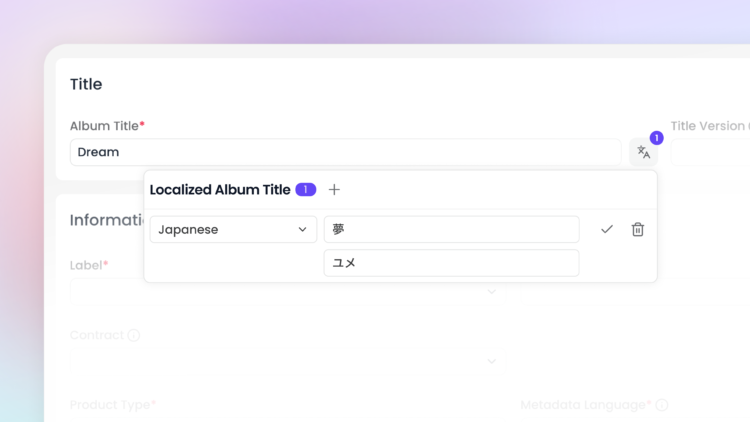
You can now provide translated versions of artist names, track and album titles directly within Labelcamp, so your metadata reaches audiences in their own language across DSPs.
Translations can be added at three levels: artist, track title, and album, each through a simple translation icon that opens a dedicated panel for language-specific versions. Once added, the translation appears directly on hover, so it’s always easy to check what’s been localized.
Platform behavior varies slightly by DSP:
– Apple Music displays translations based on the listener’s UI language
– Spotify requires matching ISRC countries to activate them
– Amazon Music supports multiple localizations
– Deezer, Meta, TikTok, YouTube Music, Anghami, NetEase and Flo are also supported, each with their own implementation.
For select languages such as Japanese, phonetic titles (Katakana) can also be added to improve searchability on DSPs.
Saves on Spotify and Apple Music
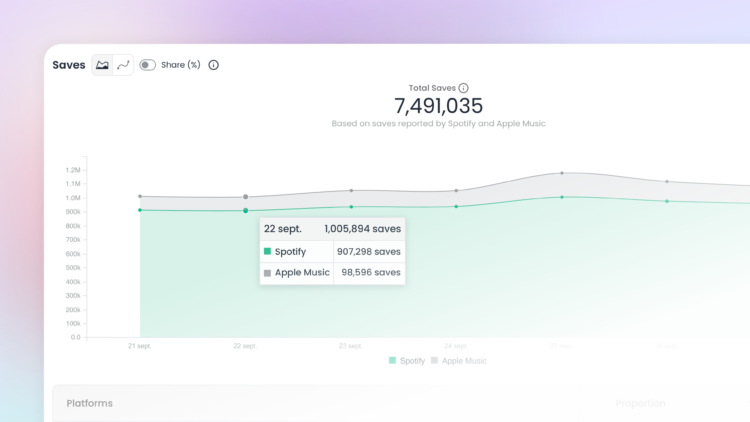
We’ve added a Saves graph to the Trends section. The new graph aggregates saves reported by Spotify and Apple Music:
– On Spotify: this includes both library additions and playlist additions, with a maximum of one save counted per user.
– On Apple Music: saves can occur at either track or album level. Album-level saves are converted into track-equivalent counts (by multiplying them by the number of tracks on the album), so they can be aggregated consistently with track-level saves.
AI Contribution
You can now declare AI contribution on your catalogue and next releases via the Labelcamp API, helping you meet DSPs’ growing requirements around AI transparency. For now, this is available exclusively through our API and will soon be available in the Labelcamp application as well.
AI involvement can be flagged across three types of elements:
– Composition and recording credits (composer, lyricist, author…)
– Visual content (static or animated cover artwork, and music videos)
– Non-audio credits (photography, art direction, management, video production; DSP support for these remains limited for now)
Tracks don’t carry their own AI attribute; declarations are made via their associated credits instead. For each element, you can set one of four levels: undeclared (the default, meaning no declaration has been made), none (explicitly declared as containing no AI), partly, or entirely.
Keep in mind that DSPs interpret these declarations differently:
– Apple Music accepts both « partly » and « entirely » declarations. Flags are applied at track or composition level, and a single AI-declared role is enough to flag the whole audio as AI-assisted. AI-generated artwork and music videos are recognized at album level.
– Spotify only takes « entirely » declarations into account — « partly » is currently ignored. Any AI-declared role flags the contributor regardless of which role they hold, and if every audio credit is declared entirely AI-generated, Spotify replaces the detailed credits with a generic « GenerativeAI » persona. Artwork and music video declarations aren’t processed by Spotify at this stage.